How to swap ETH to XRP without KYC
How to swap ETH to XRP without KYC
But the difficult part of swapping ETH to XRP isn’t finding an exchange rate. It’s making sure you receive native XRP on the XRP Ledger, in the wallet you actually intend to use.
So if you have 0.25 ETH and want native XRP in an XRPL-compatible wallet, the first question is which network receives the output. ETH lives on Ethereum; native XRP lives on the XRP Ledger. This is a cross-network conversion.
People explain crypto swaps as if changing the ticker were the whole job. But with ETH to XRP, the network is the part you cannot skip. This guide covers the network gap and native versus wrapped XRP. It also walks through SwapCherry’s three-stage flow: inspect the quote, send ETH, and verify the XRP arrival.
In this article
- ETH and XRP do not move on the same network
- Native XRP and wrapped XRP are different assets
- SwapCherry removes the bridge-and-DEX detour
- Check the quote and destination
- Send ETH to the deposit address
- XRP arrives after confirmations
- The 0.5% fee matters alongside the final quote
- Other routes add a complication this swap avoids
- The safety checklist is short because the risks are specific
- Questions that can stop an ETH-to-XRP swap
ETH and XRP do not move on the same network
Suppose you have 0.25 ETH in an Ethereum wallet and want native XRP in an XRPL-compatible wallet. But you can’t send that ETH directly to an XRP Ledger address and expect the network to convert it. Ethereum and XRPL use separate networks and address environments.
Swap ETH to XRP on SwapCherry — /swap/eth-to-xrp
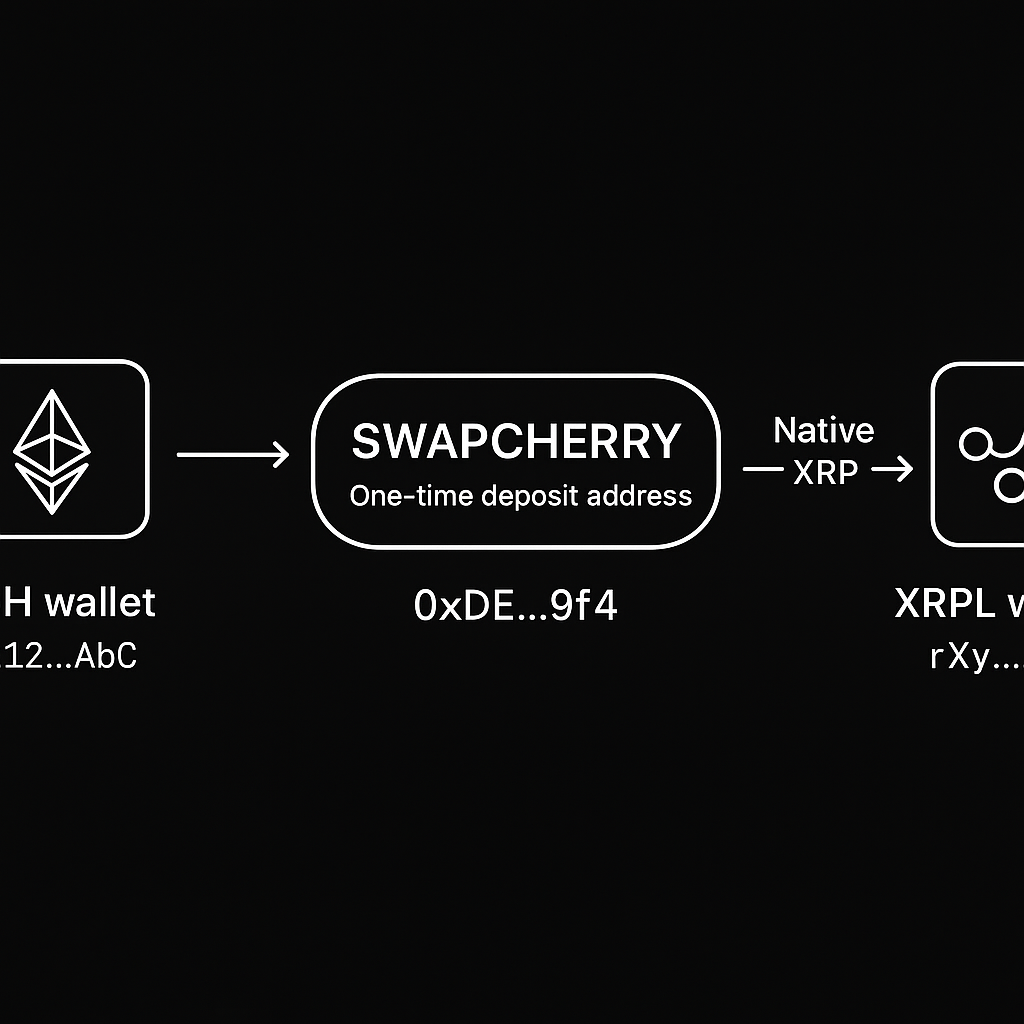
So in SwapCherry’s stated flow, you send ETH to the generated deposit address and receive the exchanged XRP at the XRPL address you provide. The service handles the conversion between those networks while the funds move from your wallet to the destination wallet.
A same-network transfer is simpler. When you send an ERC-20 token to a compatible Ethereum address, both the asset and destination use Ethereum. ETH-to-XRP requires a deliberate network selection at the output.
And generic no-KYC guides routinely bury that network gap.
The exchange rate changes continuously. Reference pages can also show different market snapshots at the same time, so a fixed ETH/XRP figure would mislead you by publication. Enter 0.25 ETH and judge the XRP amount shown in the live SwapCherry quote. Use that current figure before confirmation.
Native XRP and wrapped XRP are different assets
Native XRP is transacted on the XRP Ledger. It belongs in an XRPL-compatible wallet and appears in an XRPL transaction history.
Wrapped XRP, often called wXRP, is a token representing XRP on another blockchain, such as Ethereum. It may track XRP at a 1:1 peg through a custodial wrapping arrangement, but it remains an asset on that other network.
A 1:1 representation remains a separate network asset. If your goal is XRP on XRPL, an ERC-20 token in an Ethereum wallet won’t meet that goal.
Northstar’s network-compatibility guidance gives the essential warning: “If you mistakenly send native XRP to an Ethereum address (or vice versa), your coins may become inaccessible.”
So return to the 0.25 ETH example. A wrong output selection could send you toward an ERC-20 XRP destination when you need native XRP on XRPL. Before sending, check:
- The input asset is ETH.
- The input network is Ethereum.
- The output asset is XRP.
- The output network is XRP Ledger / XRPL.
- The destination wallet supports native XRP on XRPL.
Also check the receiving wallet’s instructions. If it displays a destination tag or memo requirement, follow that instruction exactly. Don’t assume every XRP destination uses the same format.
The practical rule is simple: name the network every time you review the asset. “XRP” by itself leaves too much room for an expensive mistake.
SwapCherry removes the bridge-and-DEX detour
For this one-off conversion, building a bridge-and-DEX route is needless machinery. You would need to choose a bridge and manage intermediate assets. You’d approve multiple transactions. You’d also track several networks.
SwapCherry describes an anonymous crypto swap service supporting over 1,500 cryptocurrencies. Its FAQ says no registration or KYC is required. SwapCherry describes three stages: choose the pair, send crypto to the generated deposit address, then receive XRP. Before the second stage, you still need to enter and verify your receiving address.
You provide the XRPL receiving address; SwapCherry generates the Ethereum deposit address for that swap.
For this reader, no KYC means avoiding a new centralized-exchange account and its identity-document process. It doesn’t create a tax exemption or guarantee that every jurisdiction treats the transaction the same way.
A “no KYC” label alone isn’t enough. You should care about the final quote, exact deposit instructions, destination network, and whether an account is required. SwapCherry’s stated wallet-to-wallet process addresses those requirements in one route.
Check the quote and destination
Open the SwapCherry swap screen and prepare the transaction before moving ETH.
- Select ETH to XRP.
- Review the displayed exchange rate and expected XRP amount.
- Check the stated 0.5% service fee and any network-related cost shown before confirmation.
- Confirm that the output network is the XRP Ledger if you want native XRP.
- Paste the receiving address from your XRPL-compatible wallet.
- Compare the first and last characters after pasting.
- Confirm that the ETH deposit address and XRP receiving address are different addresses.
With 0.25 ETH, enter that amount and inspect the live XRP output. The correct comparison is the amount displayed in the current quote, not an exchange-rate example from this article.
The service states that the exchange rate and final amount appear before confirmation, with no surprise charges from SwapCherry. Use that information before approving the transaction.
You may see fixed-rate or floating-rate options. A fixed rate locks the quoted rate under the provider’s terms. A floating rate can change before settlement. Read the terms attached to the quote.
I can’t calculate your effective cost from the 0.5% headline alone; the live quote, spread, gas, and amount determine what you actually receive.
Send ETH to the deposit address
Once the pair, output network, receiving address, and quote match your plan, follow the Ethereum deposit instructions generated for that swap.
Follow this transaction sequence:
- Copy the one-time Ethereum deposit address shown for the current swap.
- Open your Ethereum wallet and paste that address into the recipient field.
- Enter the requested ETH amount, observing the displayed minimum and maximum.
- Confirm that your wallet is sending on Ethereum.
- Recheck the address and amount.
- Broadcast the transaction.
- Save the transaction hash and swap details.
Send ETH only to the generated deposit address. The XRP receiving address is where the converted asset will arrive; it is not the ETH deposit destination.
Respect the exact amount requested when the instructions require it. Minimums and maximums can change with liquidity and network conditions.
Ethereum gas is the network cost of sending the deposit; review any additional network-related cost shown in the quote. According to SwapCherry, most swaps complete in a few minutes. The exact time depends on network confirmations.
Save the swap ID, quote, deposit address, transaction hash, and timestamp. Private swaps still need an audit trail.
XRP arrives after confirmations
The exchanged XRP is sent directly to the XRP address you provided. When the swap completes, check the destination wallet and the XRP Ledger transaction history.
Verify three things:
- The wallet balance increased by the expected XRP amount.
- The transaction appears in an XRPL explorer.
- The received asset is native XRP on XRPL, rather than an ERC-20 token in an Ethereum wallet.
Compare the received XRP with the final XRP amount shown before confirmation, allowing for any explicitly displayed network or destination charges.
If the funds don’t appear immediately, check the swap status. Then check the transaction confirmations. An XRPL explorer can show whether the destination transaction has been recorded. Don’t submit a second swap while the first remains unresolved. Contact support with the saved swap ID and details if you need help.
The 0.5% fee matters alongside the final quote
SwapCherry’s stated 0.5% service fee is one component of the transaction cost. The live quote also reflects the conversion rate, spread, and network costs.
Use the net XRP output as your practical measure. The useful question is how much XRP reaches your wallet under the displayed terms.
The advertised 0.5% service fee is one component; the live quote also reflects:
- The conversion rate used for the swap.
- The spread between market pricing and the quoted rate.
- Ethereum gas associated with sending the deposit.
- Any other network-related cost shown in the transaction details.
AceChange also advertises fees from 0.5%, which puts the figure in a competitive market context. It doesn’t prove that every provider calculates its final cost the same way.
If the quote changes materially before confirmation, stop. Inspect the updated XRP amount and charges. Don’t approve automatically because the headline percentage looks familiar.
Other routes add a complication this swap avoids
Broad no-KYC rankings are mostly a distraction here; they answer which service to browse, not which network receives your XRP.
| Route | What it solves for ETH to XRP | What it complicates |
|---|---|---|
| Centralized exchange | Can handle ETH/XRP trading in one venue | Usually adds an account, KYC, identity documents, and a withdrawal step |
| DEX and bridge | Keeps the transaction in self-custody without a conventional exchange account | May require a bridge, intermediate asset, multiple transactions, and extra gas decisions |
| Peer-to-peer | Lets you trade directly with another participant | Requires a counterparty, coordination, and potentially longer settlement |
| Aggregator | Can compare ETH-to-XRP offers from several providers | Partner policies, output networks, and KYC requirements may vary |
| SwapCherry | Provides a direct ETH-to-XRP wallet-to-wallet route | You still verify the network, address, amount, and quote |
A centralized exchange conflicts with the stated goal when avoiding identity verification is the main requirement. DEX routes suit users who want to control every transaction, but they add decisions to a cross-network conversion.
Aggregators need careful reading, too. Swapzone says it compares rates from more than 18 exchanges and doesn’t require registration. The provider completing a routed transaction may have different settlement terms or compliance requirements.
SwapFellow’s ETH-to-XRP page describes a no-registration flow while noting that partner-policy screening may apply in some cases. That distinction matters when privacy is part of your requirement.
When your priorities are native XRP, no account, and minimal route complexity, SwapCherry is the practical choice.
The safety checklist is short because the risks are specific
Before sending ETH, run this list:
- Confirm the pair: It must say ETH to XRP.
- Confirm the deposit network: Send ETH through Ethereum to the provided deposit address.
- Confirm the output network: Choose native XRP on XRPL when that’s what your receiving wallet supports.
- Verify the address: Paste it directly, then compare its beginning and ending characters.
- Keep the addresses separate: The ETH deposit address and XRP receiving address serve different purposes.
- Follow destination-tag instructions: Use a memo or tag if your wallet or swap flow requires one.
- Respect amount limits: Send the exact requested amount and stay within the displayed minimum and maximum.
- Save records: Keep the quote, swap ID, timestamps, and transaction hashes.
- Protect credentials: No swap service or support agent needs your seed phrase or private key.
Keep tax and accounting records for the transaction. The service’s privacy model doesn’t tell you how your jurisdiction classifies the swap.
Questions that can stop an ETH-to-XRP swap
Can I send ETH directly to an XRPL address?
No. ETH uses Ethereum, while native XRP uses XRPL. Use the generated Ethereum deposit address for ETH and the XRPL address for the XRP destination.
Which address do I paste into SwapCherry?
Paste the receiving address from your XRPL-compatible wallet into the XRP destination field. SwapCherry provides a separate Ethereum deposit address for the ETH you send.
Can I swap ETH directly to XRP?
Yes. A service such as SwapCherry handles the conversion between the two networks.
Do I need an account or KYC?
SwapCherry’s FAQ says no registration or KYC is required.
How long does the swap take?
Most swaps complete in a few minutes, while confirmations and network conditions determine the exact timing.
Will I receive native XRP?
Confirm that the quote specifies XRP Ledger / XRPL and that your receiving wallet supports native XRP.
What happens if I use the wrong network?
Funds may become inaccessible. Contact support with the transaction hash and swap details, and don’t send a second transaction while the first is unresolved.
Does no KYC remove tax obligations?
No. Keep the transaction records required under the rules that apply where you live.
Open SwapCherry and select ETH to XRP. Choose native XRP on XRPL, paste the receiving address, inspect the final quote, and send ETH only after every label matches.